
Making sense of Microsoft's Project Management tech stack for 2026
With the announcement of Microsoft Project Online’s end-of-life date; September 30, 2026, many organisations are now faced with the urgent challenge of preparing for a future without their trusted project management tool. This looming deadline has many PMOs and project managers concerned about how to adapt and ensure continued success after the platform is retired.
Project Online at its core is built on the foundation of a very robust, well-defined, tried and tested scheduling tool: Microsoft Project.
Why do we use schedules?
As a project manager, you ‘live or die’ professionally by your project schedule. Put quite simply, the schedule is more than a timeline; it is the operational backbone of project delivery. It enables project managers to bring order to chaos and plan out the work to be completed.
A good project schedule enables you to:
- Sequence and organise the work to be completed, and by whom;
- Establish realistic timeframes;
- Identify dependencies and avoid bottlenecks;
- Identify where there are resource conflicts;
- Identify risks in advance and apply corrective actions;
- Communicate project progress; and
- Facilitate decision-making, especially where extra scope is flagged for delivery.
When used properly, the schedule becomes one of your most powerful tools as a project manager. It's your early-warning system, helping you spot potential issues before they become real problems.
How does the Microsoft tech stack enable project scheduling?
Microsoft has been providing powerful scheduling tools for over three decades, starting with Project Desktop (or MS Project, as many refer to it). Trusted by project managers worldwide, Project Desktop is known for its robustness. With Project Online’s upcoming retirement, many users are understandably concerned about losing key features that have become integral to their workflow.
But what other project management tools are available from Microsoft?
| Tool | What it provides |
|---|---|
| Microsoft Planner | Provides a simple, visual, and collaborative work management tool that helps teams plan, track, and manage tasks and projects using Kanban boards. |
| Microsoft Planner Premium | Provides a set of enhanced features for the basic Microsoft Planner app that includes advanced project management tools like Gantt (Timeline) views, task dependencies, subtasks, custom fields, and goals. |
| Microsoft Project Desktop | Microsoft Project Desktop is the classic, powerful standalone software for complex project management, offering features like resource management, cost tracking, and baselining. |
What are the essential features of a project scheduling tool?
To be able schedule effectively, an enterprise-grade project scheduling tool needs to be able to do the following:
| Feature | What's it used for? |
|---|---|
| Task Tracking | Keep a list of all work to be done and track the progress of each task. |
| Assignment of Tasks | Break down larger tasks into smaller pieces and assign them to the right people to complete. |
| Kanban Boards | A visual board that shows tasks moving through stages like To Do → Doing → Done. |
| Dependencies | Show which tasks rely on others being finished first. |
| Estimates | Predict how long tasks will take or how much effort they require. |
| Actuals Tracking | Record the real time spent or progress made, and compare it to the estimate. |
| Set Baselines | Capture the agreed-upon plan (your baseline) so you can measure how the project is tracking against it. |
| Specify Allocations | Adjust how much of each person's time is assigned to the project (not everyone is 100% available). |
| Track Costs | Monitor costs and automatically roll them up to the total project budget. |
| Time-phased Data | Spread work and cost across a timeline so you can see when effort and spend will occur. |
| Identify Critical Path | Highlight the chain of tasks that must run on time; any delay here impacts the whole project. |
| Select Task Modes | Control how tasks behave (e.g., fixed effort, fixed duration, or fixed resource allocation). |
| Add Custom Fields | Add your own fields to capture extra information that the standard schedule doesn't include. |
| Create Master schedules | Combine multiple project schedules into one view for programs or large initiatives. |
| Timesheets | Give team members a simple way to submit the time they've worked, without project managers manually entering it. |
| Enterprise Resource Management | See resource supply and demand across all projects in your organisation to help avoid overbooking key people. |
| Enterprise Reporting | Generate portfolio-wide reports showing key milestones, progress, and blockers. |
| Enterprise Custom Fields | Create standard custom fields that can be used across all projects so reporting is consistent at the PMO level. |
How do Microsoft’s project tools stack up in 2026?
Microsoft’s current project scheduling tools cover a range of these features. When we look at them side by side we start to get a picture of the use cases and types of users that each platform has been built for.
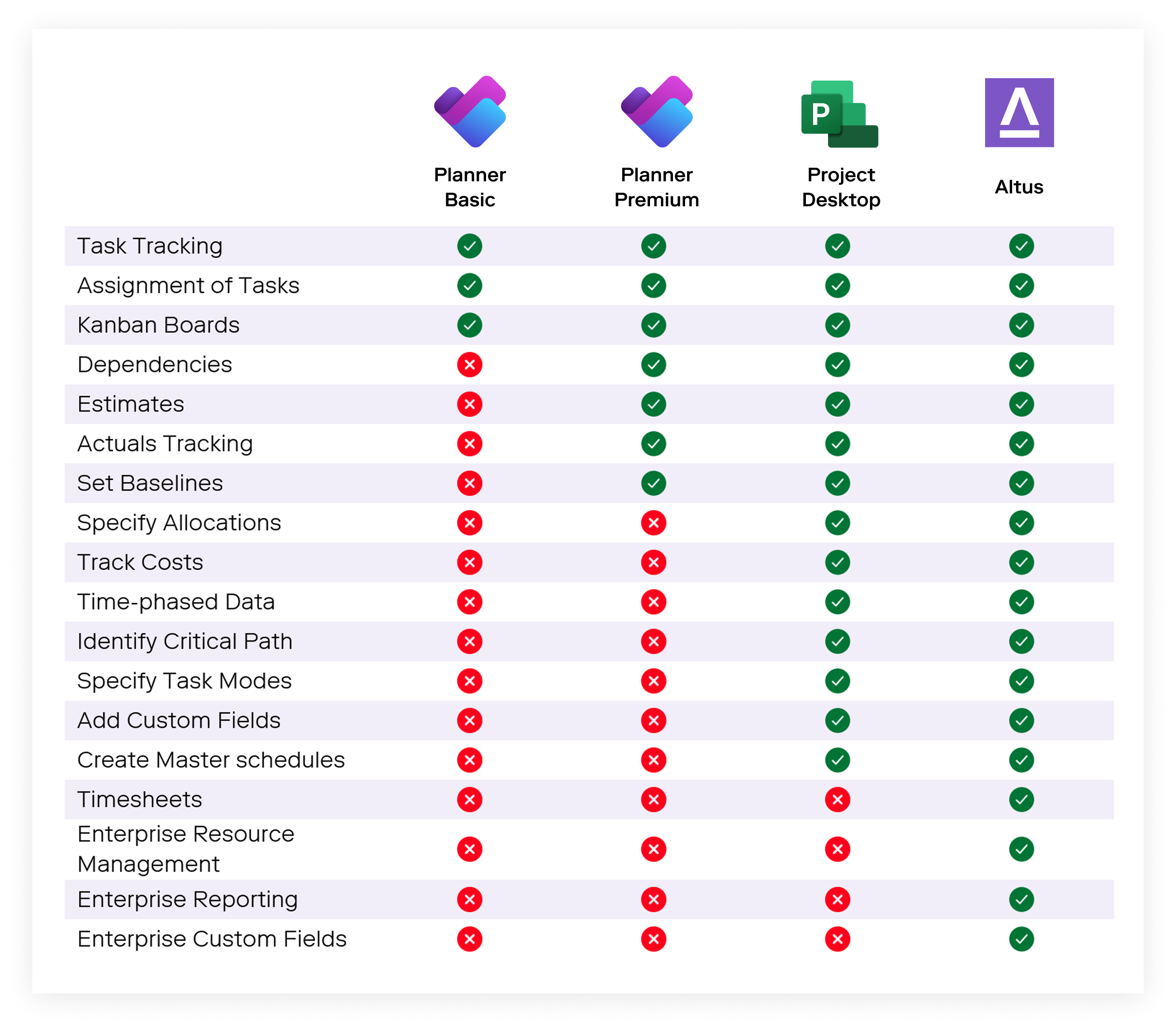
As you can see, while Project Desktop is a very comprehensive PPM tool, there are some really essential features for an enterprise PMO that will no longer be available once Project Online is retired. PMOs worldwide will be faced with challenges like:
- How do we provide a view of all the projects that are being worked on and if they are tracking within tolerance?; and
- How do we spot resource bottlenecks and over-allocations across our portfolio?
What does this mean for Project Managers and PMOs?
When Project Online disappears from the cloud late next year, project managers and PMOs will see the re-emergence of challenges and headaches that many thought were long gone. For Project Managers, there will be:
- Increased requests for information
With a lack of centralised data that enables stakeholders to ‘self-serve’, the PMO and other stakeholders will have no recourse but to constantly contact their project managers for information, leading to extra lost time responding to these requests.
- Countless hours of manual reporting
The least favourite exercise for project managers will become more laborious as all the data will have to manually gathered and put into a report to be shared. Again, more lost time.
- Loss of visibility
Project Managers will lose visibility of other projects and how shared resources are committed. This will lead to increased risk of project slippage as there will be no way to determine if their team are already working on other projects.
These limitations won’t just affect project managers—PMOs are set to face even greater challenges. The lack of comprehensive resource management and reporting tools will make it difficult for PMOs to maintain visibility into project portfolios and performance. Without these capabilities, strategic decision-making becomes harder and less reliable.
- Loss of Portfolio Data
Once project online is offline, PMOs will lose access to the rich portfolio data they’ve become accustomed to. Being able to see when projects are due to finish and their key milestones will become very difficult. - Standardisation Risk
Tools like Planner and Planner Premium are powerful but lack enterprise controls that many PMOs need, which is why Project Online was so valuable. Being able to standardise data is essential if meaningful portfolio reporting is to be generated for key stakeholders. - Increased Effort chasing Data
There will be increased effort chasing data, especially if project managers continue to use Project Desktop in a siloed, disconnected fashion.
Who is each project scheduling tool in Microsoft’s tech stack built for?
Whilst Planner and Planner premium appear to fall short in terms of features, it is worth putting them in context:
| Project size | Key strengths | Best uses | |
|---|---|---|---|
| Planner | Small | Simple to use, low administration | Marketing launch tracking, team tasks, continuous improvement |
| Planner Premium | Medium | Effort tracking, M365 connectivity | IT projects, process improvement, multi-team projects |
| Project Desktop | Medium to large | Cost tracking, timesheets, resource management | Large IT projects, construction, professional services |
As you can see, it’s not a one-size-fits-all approach here. The scheduling tools can be used to solve different project types. Not every problem is a ‘nail’ that requires a full-blown project desktop schedule.
The enterprise project scheduling gap in Microsoft’s new stack
The gaps left behind in the post Project Online world impact different stakeholders in different ways. As more tools become have become available in the marketplace, teams expect the flexibility to use the tool that’s built for their use case. Modern delivery teams are unwilling to operate with a single tool imposed on them and, when there’s tools like Altus that can connect these different systems, why should they?
There will always be a natural push and pull between Project Teams and PMOs. The reality of their functions and the KPIs they are assessed on inevitably lead to different priorities and needs from their tech stack.
| Project Teams | PMOs |
|---|---|
| Need the flexibility to use their own tools to track work. | Need standardised approaches to provide enterprise level reporting. |
| Will track metrics relevant to their chosen delivery method. | Want portfolio wide KPIs that are applicable to all projects. |
| Only track data that is required to complete the work. | Need a broader dataset covering all facets of delivery. |
| Are focussed on the delivery of a sub-set of a project. | Need to see all work being delivered across the lifespan of a project. |
| Use delivery methods and tools to manage work. | Need an enterprise tool for visibility, standardisation, and a complete view of the portfolio. |
Even if Project Online was to persist, the desire to use it more broadly for enterprise delivery is low due to its inflexibility and lack of support for delivery teams.
Depending on the project size and methodology, delivery teams will tend to gravitate towards different work management tools in, or outside of, the Microsoft ecosystem.

This is why so many organisations have ultimately turned to Altus. The best PMOs know they need to balance the need for different teams to utilise the tool that makes sense for them to work at their best. But with Altus, that no longer has to come at the expense of organisation-wide visibility. The Altus external execution tool integration pulls data from all of these scheduling tools into a single source of truth.
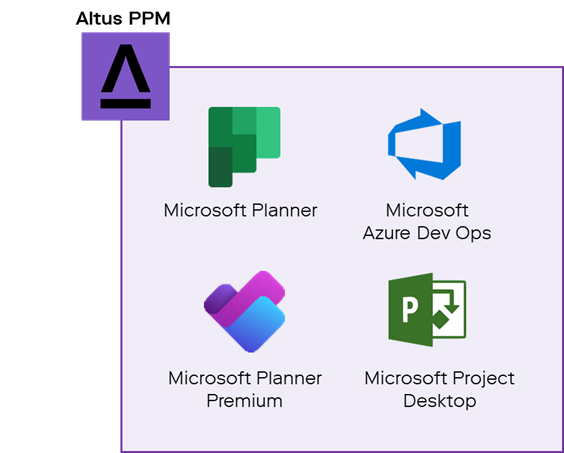
This provides organisations with the following benefits:
- Enables delivery teams to use their preferred work management tool, whether that’s in the Microsoft ecosystem or even external tools like Jira.
- Consolidate all their data in a single source of truth so that the PMO can provide the ‘complete picture’ of the portfolio to key stakeholders.
- Provides the PMO with the standardisation they need and empowers the delivery teams to manage the work delivery in the most appropriate way.
- Offers a solution for experienced project managers to retain their advanced project desktop schedules whilst not impacting less experienced users who are new to project management and need something less complex.
If you’re navigating the transition away from Project Online and looking for a flexible, future-proof scheduling solution, Altus can help. With support for multiple scheduling tools and enterprise-grade features like timesheet tracking and resource management, Altus gives you the flexibility and insight you need to stay ahead. Reach out to us today to learn how we can help your team stay on track, no matter what tools you use.
Ready to unlock project success?
Schedule a demo to find out more about how Altus can help your organisation unlock project management success and reach your strategic goals.